 highghlow
This guide is based on this guide byWanghzo(sections 1-4) and this guide byIroniaTheMaster(section 5), which itself is based on this guide bykoo00
The guide was changed to use Ghidra instead of IDA Pro and the scriptwas modified accordingly
This guide was only tested on Linux
Warning: this was only tested on an arm64 device
Prequisites
Ghidra v11.3.2 (Official website, archived download)
Il2CppDumper (this specific version of it)
Frida v16.6.6
GameGuardian v101.1 (download)
A GameGuardian-compatible device (root or a second space)
The game, installed on the device
Aquiring GetMetadata function pointer
Extract the APK file
Find
libil2cpp.soin the lib directoryCreate a new ghidra project
Select "Menu" > "File" > "Import File..." and import
libil2cpp.soOpen and analyze the file
Select "Menu" > "Search" > "Memory"
Change "Hex" to "String" and input
global-metadata.datPress "Search" and double-click on the only result
Right click on the name (
s_global-metadata.dat...)Select "References" > "Show references to s_global-metadata.dat..."
Double-click on the only reference

Find the first
blinstruction after the selected oneFind the function name (e.g.
FUN_0074e9b4)Write down the characters after the underscore (e.g.
0074e9b4)
Finding global-metadata.dat in memory
Start GameGuardian
Follow the Frida installation guide (I used frida v16.6.6)
Aquire script.js
Replace the
Valuein0xValueon line 9 with the numbers you gotearlierExit the game if it is running
Run
frida -Uf com.game.package.name -l ./script.jsA red line should appread saying
Address : ...Write down everything after the colon (this will be different onevery launch)
Dumping global-metadata.dat
Open the GameGuardian overlay
Select the game process
Click on the 4-th tab and open the menu
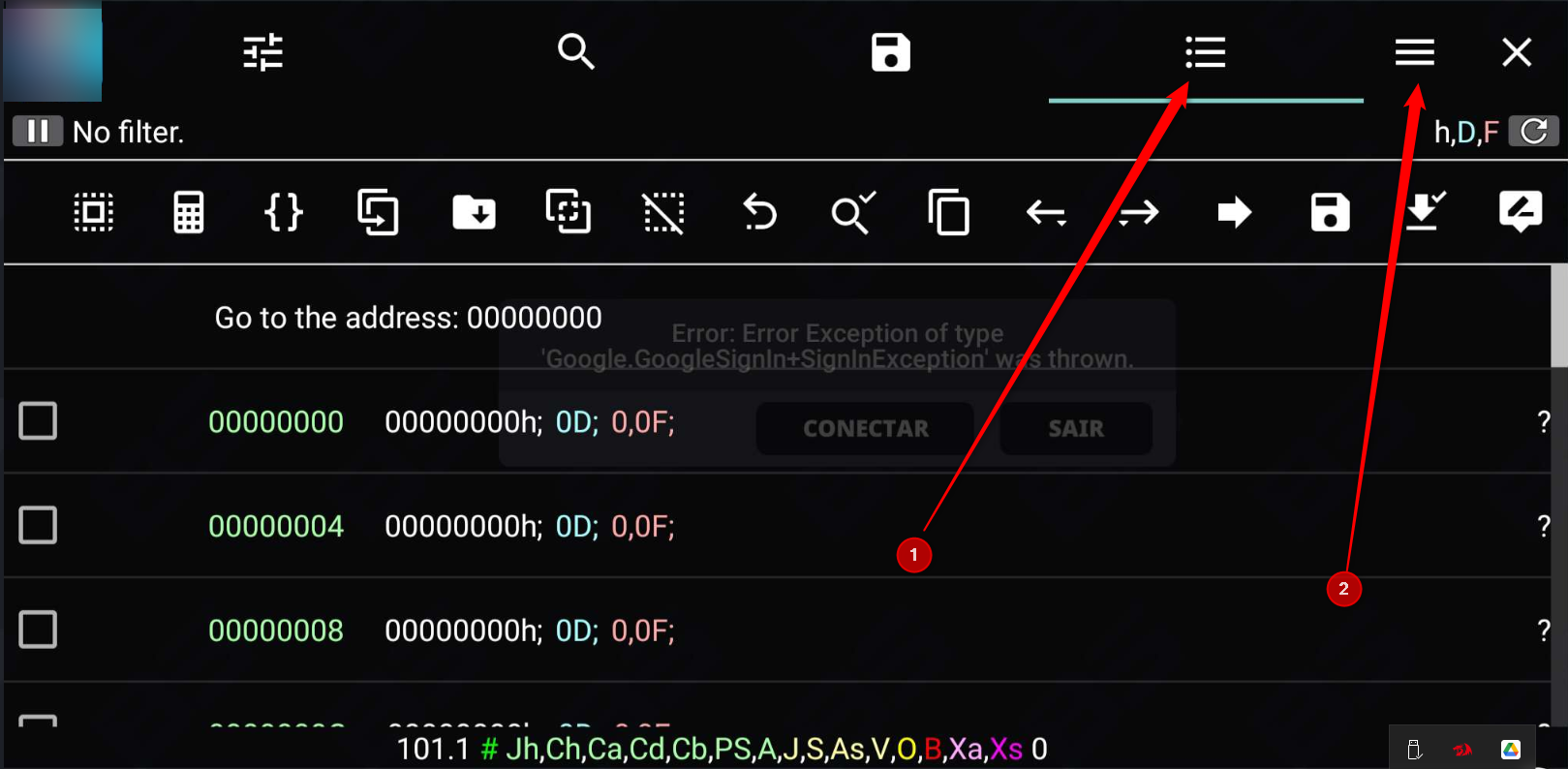
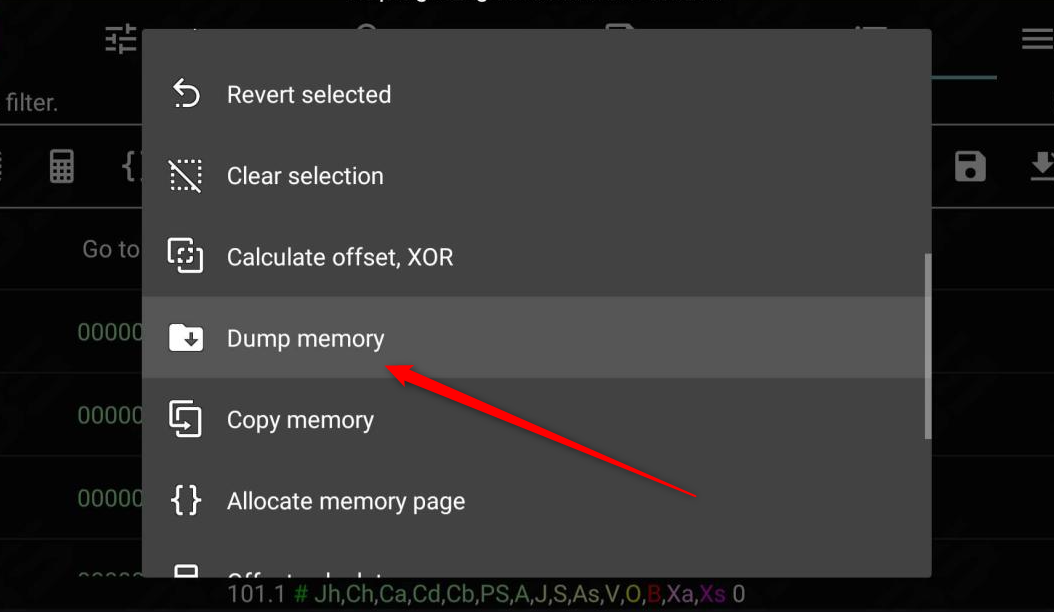
Select "Dump memory"
In the "From" input box enter the console value without the "0x"
Tap on the down arrow to the right of it
The first (selected) menu option should have
global-metadata.datin it, and should start withO: numbers1-numbers2 r--s ...Write down
numbers2Click away from the menu
Input
numbers2into the "To:" input boxPress "Save" and wait for the process to finish
(On the PC) run
adb shell "cat /storage/emulated/0/dump/*.bin" > global-metadata.dat
Decompiling the game
Unzip the APK file
Find
libil2cpp.soinlibCreate the
decompfolderRun
Il2CppDumper path/to/libil2cpp.so path/to/global-metadata.dat decompGo to the
decompRun
python3 path/to/Il2CppDumper/il2cpp_header_to_ghidra.pyStart ghidra and make a new project
Click the Code Browser (dragon head) icon
In the new window select "File" > "Import file"
Import and analyze
libil2cpp.soSelect "File" > "Parse C Source..."
Change the "Parse Configuration" to "VisualStudio22_64.prf"
Remove all entries from "Source Files to Parse", "IncludePaths", and "Parse Options"
Add
decomp/il2cpp_ghidra.hto the "Source Files to Parse"sectionClick "Parse to Program" and then "Continue". If prompted,select "Use Open Archives". This may take a while
Open the script manager (green play icon)
Press "Manage Script Directories" (the list icon in the top bar)
In the new window press "Display file chooser to add bundles to thelist" (the green plus in the top bar)
Add
path/to/Il2CppDumperClose the "Bundle Manager" window
Run the
ghidra_with_struct.pyscriptWhen prompted, select
script.jsonfrom thedecompfolderWait for all analysis to finish