 highghlow


This guide is based on this guide on4pda
Important Notice
Your IMEI's might be lost!
Instructions
Download the MiFlash tool
Download the device's official firmware in .tgz format
Unpack MiFlash and create a
logfolder in it's directoryOpen XiaoMiFlash.exe
When promted to install drivers, do that
Unpack the firmware (you may have to do that twice)
Press "select" and select the firmware dir
Choose the flashing mode: "clean all" to wipe user data, "save user data" to keep itDo not choose the default: "clean all and lock". It will lock the bootloader
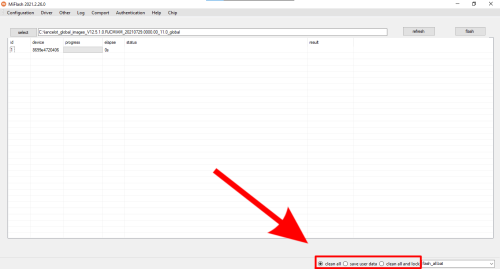
Plug in your phone while in fastboot mode
Press "refresh" and "flash"
error: flash timeout,error: Not catch checkpoint(and probably others) are ok. They just mean that the device wasn't locked